
Loopdoku by clover!
(This post is part of the Genuinely Approachable Sudoku (GAS) series.)
Sometimes the first workday after a long holiday (like the recent Thanksgiving in the US) can throw you for a loop. We don’t know if that is clover’s motivation today, but this combination of a Loop puzzle and a Sudoku will make you think more creatively than usual.
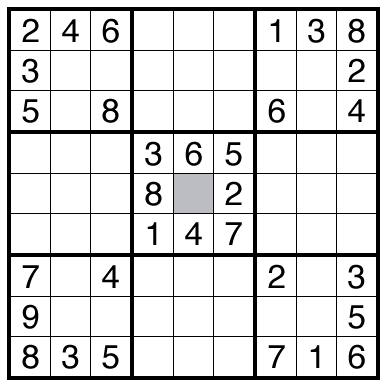
or solve online (using SudokuPad; this should now default to loading with the Pen tool on (people who already clicked may need to clear their browser cache for the short url). The pen tool looks like a square icon containing a circle and a bent line, next to the big 9 used to select the main number entry. Hitting those adjacent icons should let you alternate between entering numbers and loop segments. It is also at the top of the Settings menu (gear symbol) to turn on. Thanks to Michael in the comments for helping us get this on by default.)
Theme: Tangled Up in Loop
Author/Opus: This is the 81st puzzle from Clover, part of the Genuinely Approachable Sudoku (GAS) team.
Rules: Insert a number from 1 to 9 into each cell so that no number repeats in any row, column, or bold region. Also, draw a single, non-intersecting loop that passes through all cells except for the gray central cell, moving only up, down, left, or right between cells. The loop must travel straight through every cell with an odd number and turn in every cell with an even number.
GAS Time Standards (highlight to view): Two party hats (🎩🥳): 10:00; One party hat (🥳): 20:00. All other solvers earn a 🦕: knotty Nodosaurus.
Thomas Hits the GAS (highlight to view): 3:00, with SudokuPad replay file shared as a download for now (requires loading via settings menu with improvements expected before people should use this regularly).
Solution: PDF and solving video with explanation from GAS team.
Note: Follow this link for other less common variations of Sudoku.
Note 2: Comments on the blog are great! For a more interactive discussion, please also consider using our Daily GAS discussion post on the GMPuzzles Discord. Not a member of the Discord? Click this link for basic access.
That was genius-level setting. I loved every second of it so much so that I’m glad I didn’t get two hats. Frickin’ genius, clover. I don’t know if you read comments on this blog (am I the only one here?) but damn. I’m going to go comment on YouTube too.
As you post anonymously, we need to approve the post comment first. But once it does get on the site it goes to the setter actively even if they don’t read the blog a lot. Thanks for the feedback!
You can add “?setting-toolpen=1” to the end of the URL to enable the pen tool by default. The confetti (by which I assume you mean the “3-in-the-corner” effect) can be turned off with “&setting-puzzleevents=off”.
(In case anyone stumbles across this without knowing how URLs work: the first parameter has a ? in front, any additional ones have &.)
Thanks magician (how we described it in the post as neither the authors nor me knew this exactly)! I’ve fixed my favorite puzzles to not celebrate unimportant numbers and this puzzle to have the Pen so huge quality of life improvement by just running into documentation from you.
Very elegant : both the ruleset and the solve flow !